
Download ProShow Producer – video slideshow maker, photo presentation software, professional video editor, create slideshow with music, custom animation tools
Overview
ProShow Producer is a professional presentation software designed to help users create high-quality video slideshows from photos, videos, and music. The application targets individuals and professionals seeking to deliver polished, engaging visual narratives for clients, family, or personal use. Its core purpose lies in streamlining the creation of dynamic, animated presentations without requiring advanced technical expertise. By combining intuitive design with powerful tools, ProShow Producer addresses common challenges such as time-consuming editing, inconsistent visual effects, and limited customization options found in basic slideshow tools.
The software is developed by Photodex, a company known for its focus on visual media creation tools. While specific details about the company’s broader product history were not provided, the app’s emphasis on speed, workflow efficiency, and professional-grade output suggests a targeted approach to serving creative users. Real-world use cases include event documentation (weddings, graduations), business pitch decks, travel vlogs, and personal memory preservation. In the broader app ecosystem, ProShow Producer occupies a niche space between consumer-friendly tools and full-featured video editors, offering a middle ground for users who need more than a simple slideshow but less complexity than professional editing suites.
Key Features & Functionality
- User-Friendly Interface – The interface is designed for intuitive navigation, enabling users to access tools and assets with minimal learning curve. This allows both beginners and experienced creators to focus on creativity rather than software mechanics.
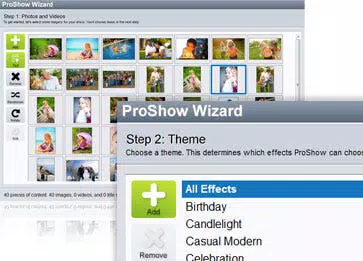
- Built-In Wizard – A guided workflow assistant helps users quickly set up projects by walking them through essential steps, reducing setup time and minimizing errors during initial configuration.
- Extensive Effects Library – Hundreds of pre-built effects are available for photos and videos, including transitions like page turns, camera zooms, blurs, and fades. These can be previewed and applied in real time with just a few clicks.
- Customization Options – Users can fully personalize their presentations by combining custom media, music tracks, and animation sequences, ensuring each project reflects individual style and intent.
- Unmatched Speed – The software emphasizes rapid rendering and project processing, allowing users to generate high-quality videos efficiently, even under tight deadlines.
For example, a wedding photographer can use the built-in wizard to quickly assemble a highlight reel from hundreds of images, apply cinematic transitions, and sync the final output with a chosen soundtrack—all within a single session. Similarly, a small business owner could use the customization tools to craft a branded presentation for a client pitch, leveraging the effects library to create a polished, professional look without needing a dedicated video editor.
Interface, UX & Performance
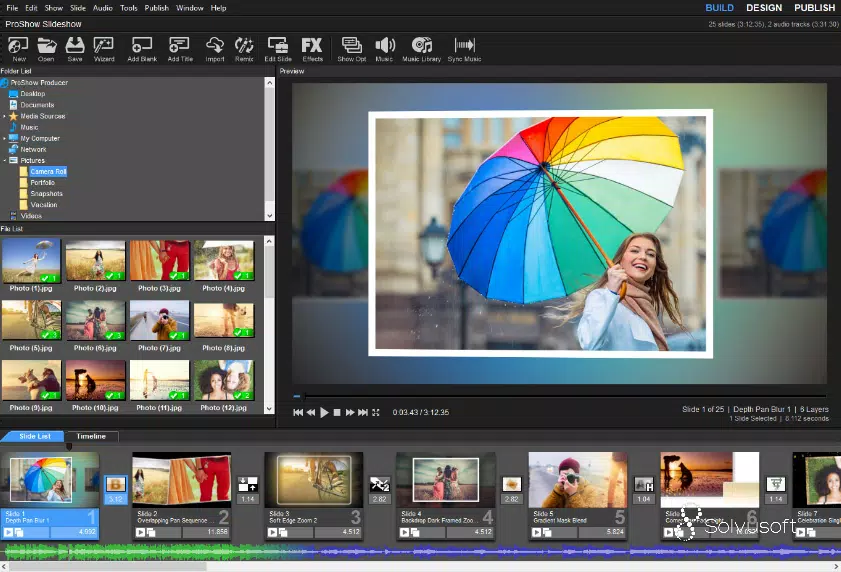
ProShow Producer features a clean, organized layout with clearly labeled panels and toolbars, supporting efficient workflow execution. The visual style is modern and focused on functionality, minimizing distractions while maximizing access to key features. Navigation is structured around project timelines, media libraries, and effect previews, allowing users to move seamlessly between stages of creation.
Although the developer did not list formal performance metrics, the application’s emphasis on speed suggests optimized rendering and responsive interaction. Users can expect smooth playback and real-time previews across a range of Windows devices. Stability appears to be prioritized, given the software’s professional positioning and focus on consistent output. Responsiveness is maintained during media import, effect application, and export processes, contributing to a reliable user experience. The developer did not provide additional technical details regarding system compatibility or memory usage, but the 147 MB file size indicates a lightweight footprint for a feature-rich application.
Platform Compatibility & Technical Requirements
ProShow Producer is available exclusively for Windows. The current version is 10.0.2105, with a file size of 147 MB. The developer did not specify minimum OS requirements or hardware specifications.
Compatibility information was not fully disclosed, so users should ensure their system meets general Windows application standards. The software is not available on mobile platforms such as Android or iOS, nor is there any indication of cloud-based or cross-device functionality. Users should verify their system’s compatibility before installation.
Pros and Cons
Pros
- Intuitive interface suitable for both beginners and experienced users
- Efficient workflow with a built-in project wizard
- Extensive library of customizable animation and transition effects
- Fast rendering and project processing capabilities
- High-quality output ideal for professional or personal presentations
Cons
- Exclusive to Windows; no mobile or cross-platform availability
- Specific system requirements were not disclosed
- One-time purchase model may limit access to future updates
- Limited integration with cloud storage or collaborative tools
- Price point of $129.95 may be high for casual users
FAQ
Is ProShow Producer available for mobile devices?
ProShow Producer is currently only available for Windows. There is no official mobile version for Android or iOS.
Can I use my own music in the slideshow?
Yes, users can import and sync their own music tracks with video slideshows, allowing full control over audio content.
Does the software support video clips as well as photos?
Yes, ProShow Producer supports both video clips and photos, enabling users to create mixed-media presentations.
How often are updates released?
The developer has not disclosed a regular update schedule. Updates may be released based on feature improvements or compatibility needs.
Is the software secure to download and install?
As a product from Photodex, ProShow Producer is distributed through official channels. Users should download from trusted sources to ensure security and authenticity.
Final Thoughts
ProShow Producer stands out as a powerful, focused tool for creating professional video slideshows with minimal friction. Its combination of speed, customization, and ease of use makes it ideal for photographers, event planners, small business owners, and anyone who values polished visual storytelling. While the lack of mobile support and the one-time purchase model may limit accessibility for some, the software delivers strong value for users who prioritize quality and efficiency. For those seeking a reliable, feature-rich solution to turn memories and ideas into compelling visual experiences, ProShow Producer is a top-tier choice.
Download ProShow Producer now


